
Blippit School User Manager Dashboard (2026 app ver. 3+)

January 1, 2026
Who uses this Dashboard?

Managing users is a job that's done in the School User Dashboard, not the app. The Dashboard allows for more accurate entry of information like names and email addresses compared to an onscreen keyboard.
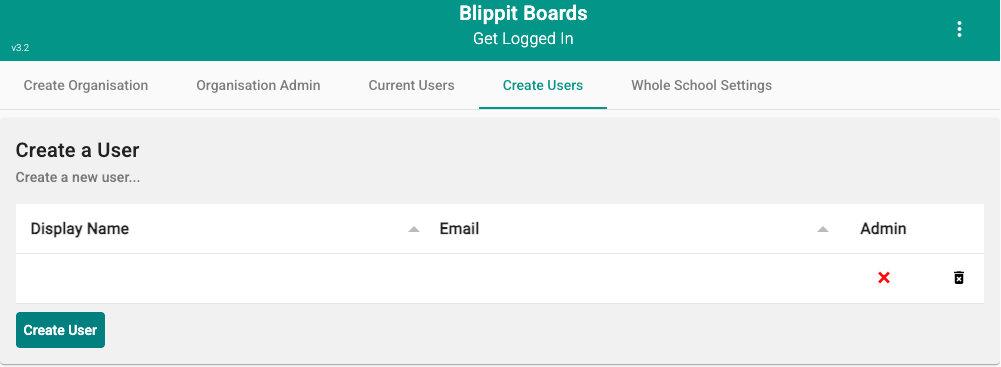
How to add new users
  1. Click 'Add Another User' after each row is added and finish by pressing 'Create Users'.
  2. Click the red 'X' until you get a green 'tick' if you want to make certain people into Admins too.
  3. An email invitation will go out to each person to invite them to join the school's account.
Create users in the School User Management Dashboard
Important: Email invitations

Invitation links, sent out immediately by email, are only 'live' for about 60 mins for security reasons.  After this time has elapsed, the link will show as 'expired'.  To get a fresh link emailed immediately, go to the School User Management DashBoard or app login to tap 'Forgotten Password' entering the email with which you are registered. Check your junk/clutter folder just in case the email and new link go there.

Typical housekeeping tasks for an Admin

These tasks help to keep Blippit Boards in your school well organised. For example:

  • disabling or deleting user accounts where people leave school
    • remember, Blippit Boards preserves board evidence after someone has left and relabels it to 'Archive'.
  • removing/updating user Admin privileges
enabling teachers as admins and managing access
Downloads
