Create and Share Subject Reports in Blippit Boards
January 1, 2026
Blippit Boards: Major App Features
Reports show moments that teachers have already captured and shared on boards via the app. Together with the AI-powered Curriculum Snapshot, new insights can be had through reporting.
to help subject leaders quickly improve their knowledge and understand a subject narrative using the AI-Supported Curriculum Snapshot which gives a view on Curriculum Breadth & Coverage, The Curriculum in Action (lived experience) and advice on Capturing the Narrative Depth.
to help with curriculum reviews and deep dives
for governor and SLT updates
to support work for accreditation frameworks such as
Eco-Schools Green Flag
UNICEF RRSA
Global Neighbours
What reports contain
A report automatically includes these items in a single PDF or Word for:
board titles
descriptions
tags applied
photos
videos (via QR codes)
If you download a Word version, you can also type directly into the report to add:
strengths
next steps
areas for development
before sharing it with colleagues.
If you choose to get the Curriculum Snapshot too, then this helps you to know what you've got in front of you, the themes it reveals and whether you need to ask other teachers to add more tags or description detail to generate clearer understanding of what's being gathered via Blippit Boards.
How reports are created in Blippit Boards
Reports are built from simple filters and tags. You can filter what you see and report on by 'person/people' too.
filter the boards timeline by tags to get the boards you want to see, for example:
subject
year group
phase
any other tag combinations
Review the list of boards returned.
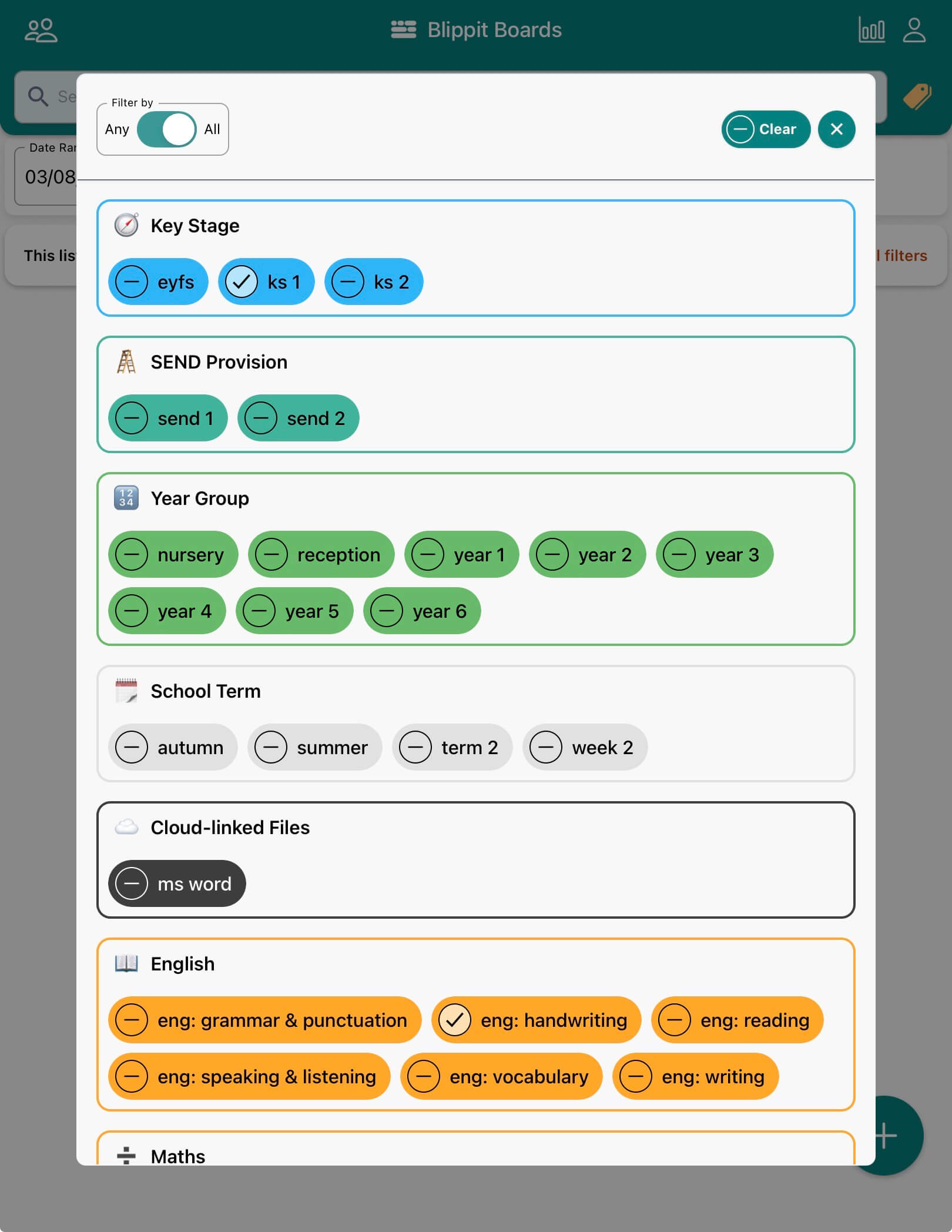
Optionally, tap the tags filter icon to flick the 'Any/All' switch for more specific reports.
You might want a report that centres around moments shared by a specific member of staff, so tap the 'people' icon in the top left corner to select a person on whom to also filter.
Tap PDF or Word Report
Opt to include a Curriculum Snapshot and check the output language matches what you need e.g. English (default) or Welsh.
A report is generated from the filtered boards and will be shared with you via email to download. This can take a minute or two to land. The download link is active for 60 minutes. If the report isn't downloaded within the hour then the link will expire and a report will need requesting again.
See the 'Any/All' switch activated here. This teacher wants to see only those boards that are tagged with BOTH ks1 + eng:handwriting so that their report focus is tightly focused on moments matching both.
Reports are 100% more useful with properly tagged boards
Tags help drive good reporting and charts.
Because:
teachers add tags to boards
tags drive filtering
filtering drives reports
good tagging means more granular
reports
charts
Subject Leaders can also refine or add tags to colleagues’ boards (where permissions allow) to improve the accuracy of reporting.
Learn about creating boards where you invite others to be contributors or are yourself
Video in reports (QR codes)
If a board contains video, the report:
displays a QR code
scanning the QR code opens the video on a mobile device
Examples of reports schools commonly create
Schools often generate single focus reports for
a subject across the whole school
a single phase or key stage
writing in foundation subjects
oracy or vocabulary development
inclusion or wellbeing priorities
Eco-Schools / RRSA / Global Neighbours accreditation evidence
But, the same moments can support multiple priorities without extra workload. More than one focus can be represented in a report simply by filtering on more than one tag.
Good practice for helpful reporting
Reports work best when schools:
model what a good board looks like
use Curriculum Snapshot to help teachers understand what may not be immediately apparent
encourage clear, accurate tagging
add clear descriptions for context
keep photo sets purposeful rather than repetitive
use photos or video where it adds meaning
Reports are available 'on demand' and reflect the current body of moments shared from the curriculum, rather than being something created manually at the end of a term under pressure.